

A slug in Yoast SEO is the readable part of a page URL that identifies a specific post or page. For example, in karachiseoservices.com/seo-slug-guide/, the slug is seo-slug-guide. Yoast SEO lets you edit this text while you optimize a WordPress page, helping you create clear, relevant URLs that match the page topic.a
A good SEO slug is short, descriptive, and built around the page’s focus keyphrase. It does not guarantee rankings, but it helps search engines interpret context and people understand a link.
What Is a Slug in SEO?
A URL slug is the human-readable segment of a web address that identifies an individual page. It usually appears after the domain and any folder or category path. In example.com/blog/wordpress-seo-tips/, the slug is wordpress-seo-tips; the full URL is the permalink.
WordPress typically creates a slug from the title of a new post or page. It converts letters to lowercase, replaces spaces with hyphens, and removes many punctuation marks. The automatic result may still be too long or include words that do not help explain the topic, so review the slug before publication.
For example, a post titled “The Complete Guide to Improving Your WordPress SEO in 2026” could receive the slug the-complete-guide-to-improving-your-wordpress-seo-in-2026. A more focused version could be wordpress-seo-guide. The shorter version keeps the central topic and removes unnecessary words.
Slug vs. Permalink: What Is the Difference?
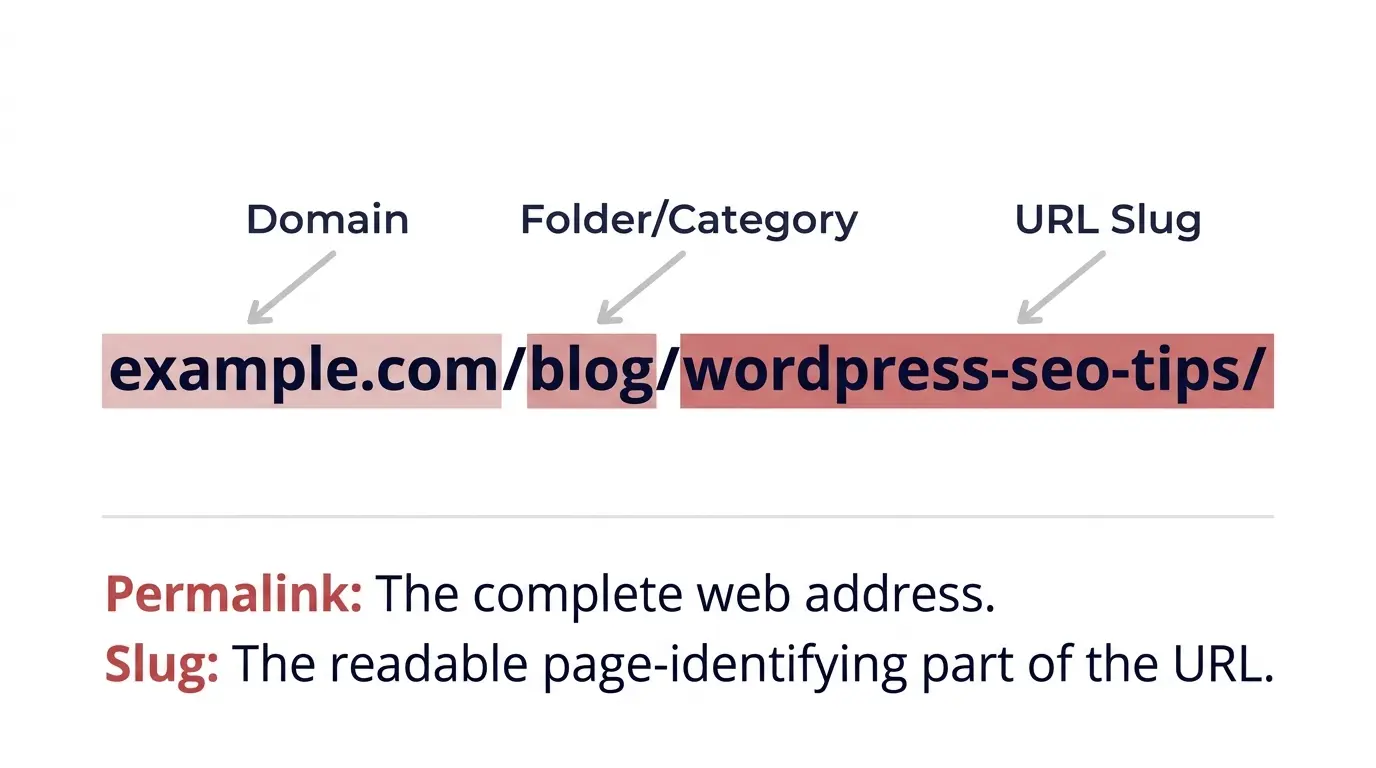
A permalink is the complete URL used to access a page. A slug is only one part of that address. The difference matters because changing an individual slug affects one URL, while changing the WordPress permalink structure can affect URLs across the website.
For example, example.com/seo-slug-guide/ uses the post-name structure, while example.com/wordpress/seo-slug-guide/ adds a category path. WordPress controls the general format under Settings > Permalinks. Choose a consistent structure early because changing it later can break existing links unless you add appropriate redirects. Document all existing URL patterns before major site-wide changes to prevent broken links and lost visits.
Why Is a Slug Important in SEO?
A carefully written SEO slug supports clarity, relevance, and site organization. Search engines can use words in a URL as a lightweight context signal, but the slug alone does not determine rankings. Content quality, search intent, links, technical health, and many other factors matter.
A useful slug clarifies the topic, sets expectations before a click, supports a clear website structure, and makes links easier to share. For example, family-lawyer-karachi is more informative than ?page=482.
A relevant slug may support click-through rate (CTR), but Google can rewrite displayed URLs and snippets. Do not expect a slug change alone to produce a ranking or traffic increase. Use a slug that accurately describes the page, then make sure the page delivers the information its URL promises.
Where WordPress Uses Slugs
WordPress uses slugs for posts, pages, categories, tags, author archives, and custom post types. Category and tag slugs identify archive pages, which can appear in search results when they offer distinct value. Keep slugs unique; WordPress may append a number to a duplicate, such as seo-guide-2. Check duplicates before publication and review traffic, links, and redirects before changing taxonomy slugs. For most new sites, the Post name permalink structure keeps URLs readable.
How Does Yoast SEO Help You Edit a Slug?
Yoast SEO provides a convenient place to review the URL slug while you optimize a WordPress post or page. The exact panel layout may vary with your WordPress editor and Yoast version, but the slug ultimately controls the page’s WordPress URL.
Edit a slug in the WordPress block editor
Open Posts or Pages in WordPress and edit the relevant item. In the settings sidebar, locate Permalink and replace the slug with a concise, descriptive phrase. Save or select Update. Depending on your editor and Yoast version, you may find the slug in the Yoast SEO panel’s search appearance controls; otherwise, use the WordPress permalink field.
Edit a slug in the Classic Editor
In the Classic Editor, select Edit beside the permalink below the title, enter the slug, confirm, and select Update. Check the live URL afterward.
How to Create an SEO-Friendly Slug in Yoast SEO
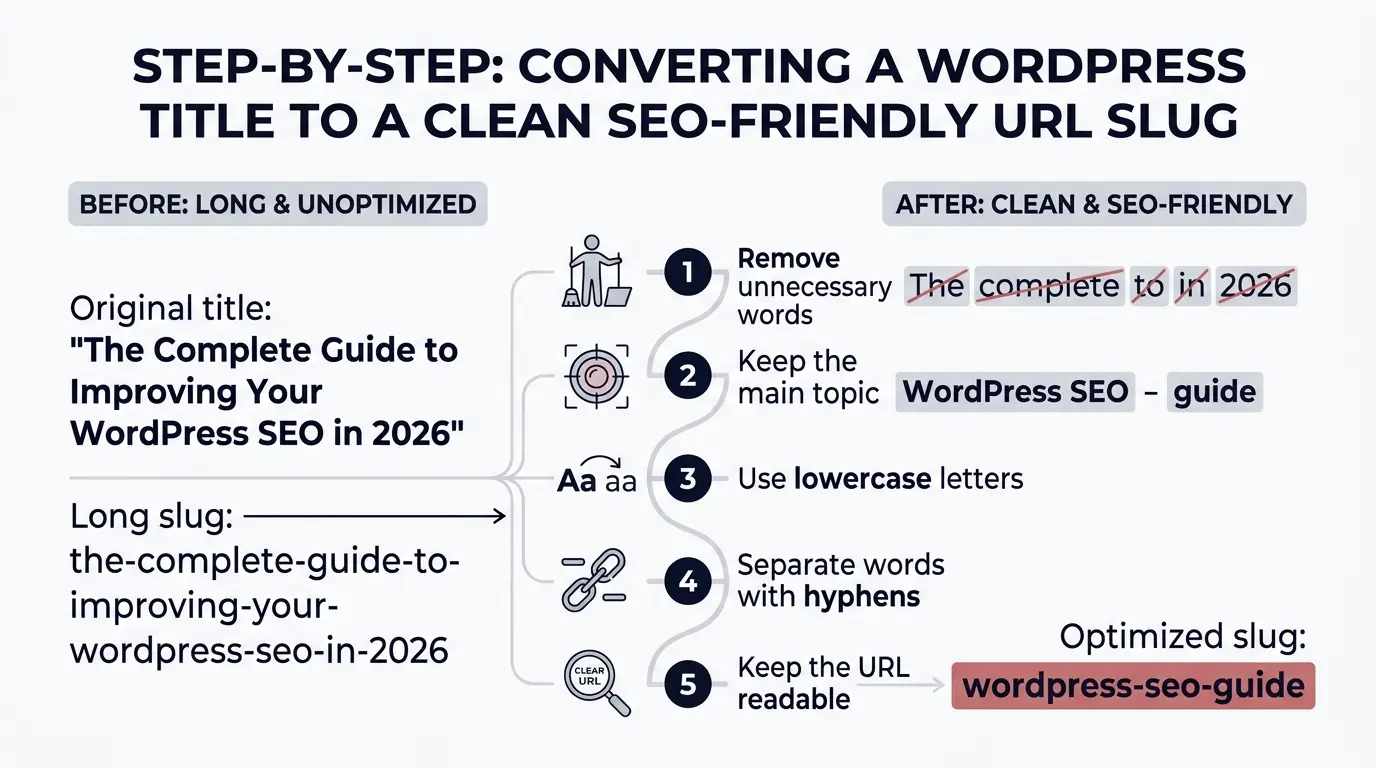
Use the following practices when you choose or edit a slug.
1. Keep the slug short and descriptive
Aim for around three to five meaningful words when practical. There is no universal character limit; clarity matters more than an arbitrary number. wordpress-seo-guide is more focused than the-complete-guide-to-understanding-wordpress-seo.
2. Include the focus keyphrase naturally
Use the primary topic phrase when relevant, such as seo-slug-guide or local-seo-services. Avoid repeating keywords or adding unrelated terms. Keyword stuffing makes URLs awkward without creating stronger relevance.
3. Remove unnecessary stop words
Remove words such as “the,” “a,” and “for” when meaning stays clear. Keep a word if removing it would make the phrase confusing.
4. Use lowercase letters and hyphens
Use lowercase letters and hyphens, such as wordpress-seo-tips, rather than WordPress_SEO_Tips. Hyphens clarify word boundaries, and consistent lowercase formatting prevents avoidable URL variations on case-sensitive systems.
5. Avoid special characters and unnecessary numbers
Use letters, meaningful numbers, and hyphens rather than symbols. Skip years for evergreen pages unless a year is central to the search intent, so updates do not require annual URL changes.
6. Match the page’s actual content
Match the slug to the page’s purpose. A high-volume keyword is unsuitable when the page does not satisfy that intent. Review the title, heading, focus keyphrase, and content together.
7. Keep URLs consistent across the site
Use a predictable naming style for similar pages. Avoid near-duplicate slugs unless each page serves a distinct search need.
How to Check Slug Optimization in Yoast SEO
Yoast SEO can help you review a focus keyphrase, SEO title, meta description, and content analysis. The exact checks depend on your plugin version and settings. Treat plugin feedback as guidance, not a guarantee that Google will rank a page.
Use this practical checklist:
- Topic match: Does the slug describe the main subject accurately?
- Focus keyphrase: Does the primary phrase appear naturally where useful?
- Readability: Can a person understand the URL quickly?
- Length: Can you remove words without losing meaning?
- Formatting: Does the slug use lowercase letters and hyphens?
- Uniqueness: Does the URL identify one page rather than duplicate another page’s purpose?
- URL status: Does the published URL return the correct page rather than a 404 error?
A green Yoast SEO analysis result does not guarantee a top position. Review content quality, headings, internal links, mobile usability, indexability, and metadata too.
Can You Change a Slug After Publishing?
Yes, you can change a published slug in WordPress, but the URL changes as well. The old address may stop working unless WordPress or a redirect rule sends visitors to the new URL. A broken old URL can waste backlinks, disrupt bookmarks, and lead users to a 404 error.
Change a live slug only when the benefit is clear. If necessary, follow these steps:
- Record the current URL and choose the replacement carefully.
- Create a permanent 301 redirect from the old URL to the new URL.
- Update internal links, navigation menus, canonical references, and relevant campaign links.
- Check the XML sitemap and ensure the new URL is the one listed.
- Test the old and new URLs, then monitor indexing, traffic, and errors in Google Search Console.
Yoast SEO Premium and other WordPress plugins may provide redirect tools; verify your installed features. Avoid redirect chains and send each old URL to its closest relevant replacement, not an unrelated homepage.
Common Slug Mistakes to Avoid
Five mistakes commonly undermine URL clarity:
- Leaving a long auto-generated slug: Trim title words that do not help identify the topic.
- Stuffing keywords: Use the main topic naturally instead of repeating several keyword variations.
- Using a vague or misleading phrase: Ensure the slug matches the page content and search intent.
- Changing URLs without redirects: Preserve the path for visitors and search engines when a live address changes.
- Creating duplicate or inconsistent URLs: Keep slugs unique and maintain a consistent structure across similar pages.
Do not confuse slug optimization with the entire SEO process. White hat SEO depends on useful content, sound technical practices, and legitimate authority signals. Black hat tactics such as keyword stuffing or deceptive redirects can damage user trust. Grey hat tactics can create risks when they conflict with search engine policies. Focus on relevant content, thoughtful internal linking, and responsible link building instead.
For businesses in multiple countries, URL structure and language targeting need careful planning. International pages should use clear language or country sections and a documented redirect plan.
Final Recommendations
Create the slug before publishing whenever possible. Keep the wording concise, include the main topic where appropriate, use lowercase letters and hyphens, and check that the final URL works. Yoast SEO can help you review page optimization, but editorial judgment remains essential.
If your website has confusing URLs, audit pages with traffic or backlinks first. Make justified changes, redirect old addresses to relevant replacements, and monitor results. For businesses targeting multiple countries, international SEO services can help improve international site structure, language targeting, and URL consistency.
Frequently Asked Questions
What is slug used for?
A slug identifies a specific page in a readable URL. It helps users understand the page topic and gives search engines additional context about the content. A descriptive slug also supports consistent website organization and makes links easier to scan, share, and recognize.
Why is a URL called a slug?
The term “slug” refers to the short, human-readable text used to identify a web page within a URL. A URL slug provides a compact label for the page. In example.com/seo-guide/, the words seo-guide form the slug.
What is a slug in Yoast SEO?
A slug in Yoast SEO is the editable URL text for a WordPress post or page. You can use the slug field to create a concise address that reflects the page’s main topic. The slug becomes part of the page’s permalink after you save the content.
How to create an SEO-friendly slug in Yoast SEO?
Open your WordPress post or page, find the permalink or slug field, and edit the URL text. Use a short, descriptive phrase with lowercase letters, hyphens, and a relevant focus keyphrase. Remove unnecessary words and save your changes before publishing.
Can you change a slug in Yoast SEO after publishing a post?
Yes. You can edit a published post’s slug, but you must redirect the old URL to the new URL with a 301 redirect. Update internal links and check the new address to prevent broken pages and preserve access from existing links.